3. Example 2 – Client-based TAPI connection
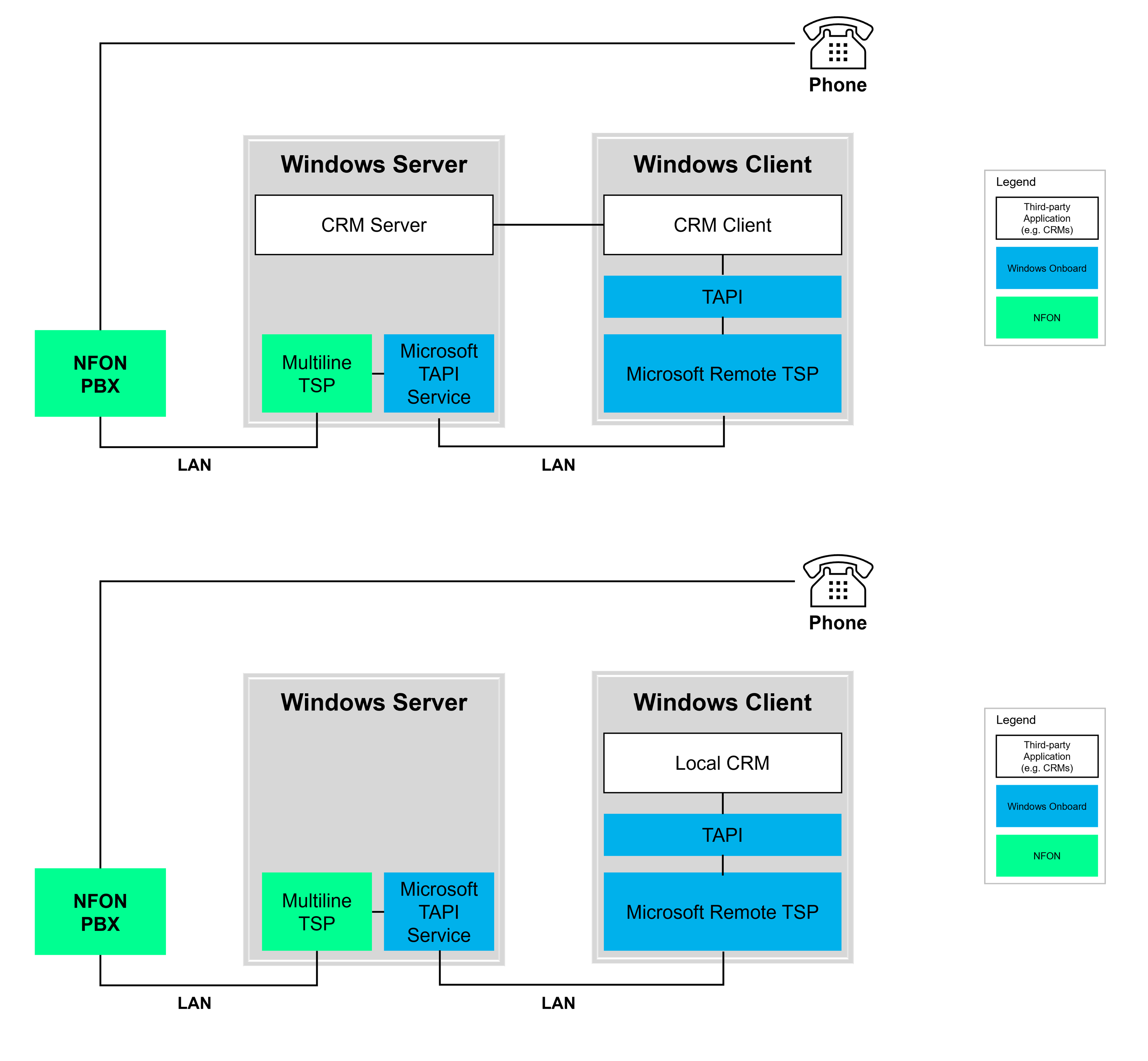
In modern IT architectures, a combination of centrally managed multi-line TAPI and a locally installed CRM system is quite common. The aim is to give the CRM access to central telephony functions via the local TAPI interface – without a direct physical connection to the PBX.
Architecture overview
The Multiline TAPI is installed on a central Windows server (see Multiline TSP Setup ) and connected to the PBX. All available lines are provided via a TAPI driver (TSP) (see User line configuration ).
The TAPI server makes these lines available for remote access in the network.
The Windows TAPI component is used on the client PC to connect to the TAPI server. To do this, remote TAPI access is activated, e.g. with the command tcmsetup /c <server name> (see Client configuration ).
The locally installed CRM system uses the Windows TAPI interface to access the line provided by the server, as if it were available locally.
More details
Centralised provisioning : The TAPI server manages all lines centrally. These lines are assigned to the PBX via the Multiline TSP.
Remote connection : On the client, tcmsetup is used to register the TAPI server as the source for lines. The assigned line then appears in the local TAPI dialogue.
CRM integration : The local CRM accesses the line via the TAPI interface. Functions such as caller identification, dialling by click (click-to-dial), logging and call windows are available.