1. Basic functions
1.1. Telephone overview
Panasonic DECT mobile handset (KX-TPA50):
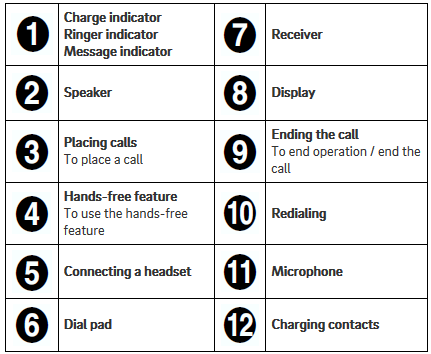
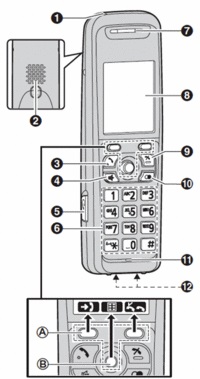
 |
Panasonic DECT-Basis (KX-TGP500):
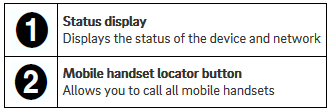
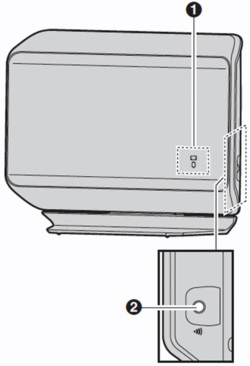
1.2. Placing calls
Mobile handset
Placing calls with the mobile handset
Pick up the handset and dial the telephone number.
To correct a digit, press
 .
.Press
 or
or  .
.To end the call, press
 or return the mobile handset to the charger.
Using the hands-free feature
Dial the telephone number and press
 .
.To end the call, press
.
Note
To return to using the receiver, press .
Adjusting the receiver or speaker volume
Repeatedly press the joystick up or down during the call.
Placing a call using the redial list
The redial list stores the last 10 numbers dialed (max. 32 digits each).
Press
 .
.Select the desired telephone number.
 /
/  When pressing and the other party’s line is busy, the device automatically redials the number several times. While the mobile handset is waiting for redial, the ringer indicator flashes. To cancel, press .
1.3. Incoming calls
Answering calls with the mobile handset
When a call is coming in, the mobile handset’s ringer indicator flashes rapidly.
Remove the mobile handset from the charger and press
, or , when the device is ringing.To end the call press
or return the mobile handset to the charger.
Adjusting the ringer volume on the mobile handset
With the mobile handset ringing for an incoming call:
Repeatedly press the joystick up or down to select the desired volume.
Programming the volume in advance:
 (Joystick)


 / : Select the desired volume.
1.4. Missed calls
Missed calls are indicated on the mobile handset display (“Missed Calls”).
To access the missed calls list, press the softkey  .
.
You can then page through missed calls using /  .
.
1.5. Hold
Press
 during an external call. The active call is now placed on “Hold”
To cancel holding the call, press
or .
1.6. Call waiting/Toggle calls
You are taking a call. The call waiting tone indicates a second call is incoming. Simultaneously, a line icon flashes at the top of the display and the display also shows the telephone number or, for internal calls, the name of the extension.
Press
 to accept the call waiting.
Using the
you can now switch between the two calls.To end a call, simply press
during the active call.
The other call is now on “Hold”.
Press
, to return to the call on hold.
Note
Toggle refers to switching between 2 different telephone calls. Toggling places one of the parties on hold and plays hold music while you are speaking to the other party.
1.7. Conference calls
Your Panasonic mobile handset allows you to make a 3-way call.
Call the 1st party.
Once you have reached the 1st party, press the menu key
(Joystick), and select “4=Conference”. You can alternatively press the number “4” on your keypad. The active call is now placed on “hold”.Then call the 2nd party and wait until you have reached the 2nd party.
Press the softkey
 to activate the 3-way call. The display now indicates Conference.
Note
A conference call with more than 3 parties can easily be set up on the administration portal: Please refer to the Administration portal.
1.8. Attended call transfer
During an active call, press the menu key. (Joystick)
Now, select “2=Send”. You can alternatively press the number “2” on your keypad. The active call is now placed on “hold”.
Now, dial the party to whom you would like to transfer the call. To do so, enter the party’s telephone number and press .
Wait for the other party to answer, then announce the call. This step can also be omitted, if necessary.
Press the softkey  .
.
1.9. Unattended call transfer
During an active call, press the menu key. (Joystick)
Now select “3=Send blind”. You can alternatively press the number “3” on your keypad. The active call is now placed on “hold”.
Now, dial the party to whom you would like to transfer the call without making an enquiry.
Press the softkey .